You may want to disable a user account to stop the user from accessing Lime Street Marketplace. When the account is disabled, the user is unable to log in and use the console but the account is not removed from the system. If required the user account can also be re-enabled at any point in time.
Admin users can perform these tasks in the
User Management section of the console.
This article is for Admin users both Broker Admins and Underwriter Admins or those users in the User Management group. Non-admin users are unable to access User Management. The images display Broker ones but the process is the same for Underwriters except for Groups
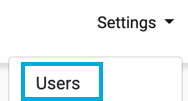
To disable or enable a user press the Settings>Users option in top menu:
To edit a user, click on the Edit button for the user in Users list.
Example of User in User List:


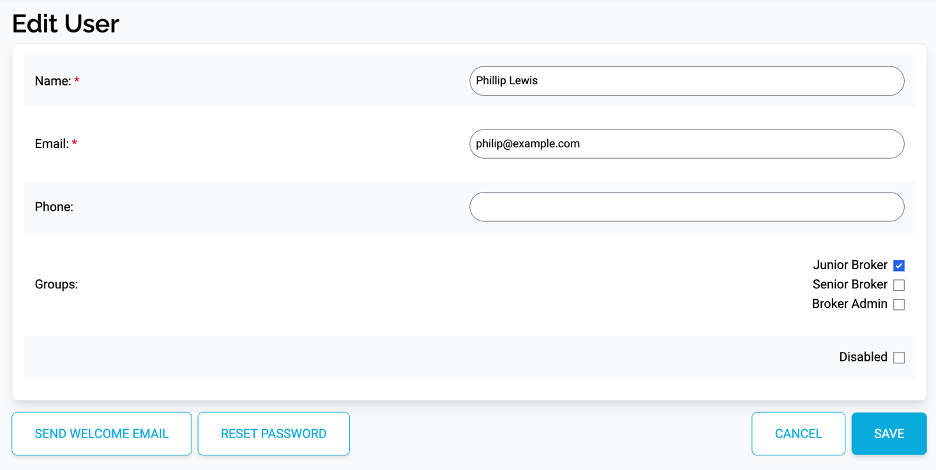
This displays the Edit User page.
Example of Edit User Page:
Disabling a User Account
You can prevent a user from logging in to the system by disabling the account. Check mark the Disabled box.

When an account is disabled, it can be clearly seen as that status in the User List in the Last Login field:

Once you have updated the details for the user press the Save button.

Enabling a Disabled Account
The account is not deleted from the system and can be reinstated by unchecking the Disabled box.

The user will then be able to use the account to log back in to the system.
Once you have updated the details for the user press the Save button.
Delete Account Option: If you would rather remove the account from the system then you can use the
Delete Account feature. This will delete the account from the system and it cannot be retrieved or re-enabled.